PojavLauncher
Screenshots
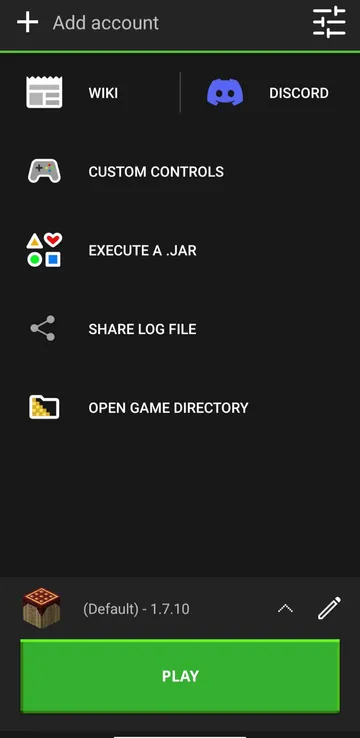
PojavLauncher makes it possible to play Minecraft Java Edition on mobile devices. Many players prefer the Java Edition because it offers unique features. However, playing this specific version usually requires a computer. This special software changes everything for mobile gamers. You can now access your favorite worlds anywhere. Consequently, you do not need to sit at a desk to enjoy the full PC experience. This article explores how the tool operates. Furthermore, we will look at how you can optimize it for the best performance.
What is PojavLauncher and How Does It Work?
PojavLauncher is an open-source tool that executes Java-based code on mobile operating systems. Specifically, it creates a compatibility layer for Minecraft. Therefore, the game thinks it is running on a standard computer. The software replicates the Java Runtime Environment effectively. Because of this, you can load almost any version of the game. You can play classic versions from years ago. Additionally, you can launch the newest updates on your phone.
The system uses local files to run the game files directly. First, it downloads the official game assets from Mojang servers. Then, it compiles these assets to run on mobile processors. This process requires a decent amount of device memory. However, the developers optimized the tool to run smoothly on many devices. As a result, mobile users get an authentic Java experience.
Developers work constantly to improve the underlying code. They update the launcher to support newer Java versions. As a result, the tool stays relevant as the game evolves. You can experience the latest snapshots without waiting for months. This dedication makes it a reliable choice for long-term play.
Key Features of This Minecraft Java Launcher
This unique tool includes several advanced capabilities for gamers. For example, it supports multiple user profiles simultaneously. Therefore, you can switch between different accounts easily. You can log in with a Microsoft account. Alternatively, you can use offline profiles for local play.
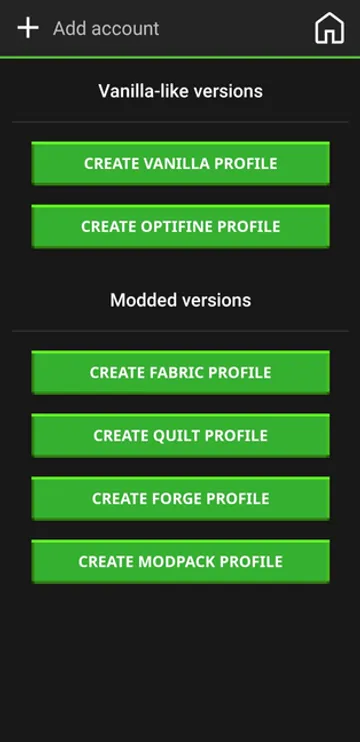
Another important feature is version selection. The launcher allows you to select alpha, beta, or release versions. Furthermore, you can install modified versions of the game. This means you can use popular mod loaders like Forge and Fabric. Consequently, you can experience complex mods on a handheld screen.
Here is a list of core features:
- Full compatibility with official Minecraft accounts.
- Support for custom game modifications and shaders.
- Multiple profile management for different game versions.
- Active updates from an open-source developer community.
The custom control editor is incredibly detailed. You can save multiple control layouts for different scenarios. For example, you might want one layout for survival mode. Then, you can use a different layout for player-versus-player battles. This level of customization provides great flexibility. These features make the launcher highly effective for dedicated fans.
How to Set Up PojavLauncher on Your Device
Setting up PojavLauncher requires a few straightforward steps. First, you must download the official installer file. Make sure you get it from a safe source. Next, open the file to install the launcher on your phone. Then, launch PojavLauncher to begin the initial configuration.
You will see a login screen immediately. Here, you should enter your Microsoft account credentials. This step ensures you can access your purchased game. Alternatively, select the offline mode if you want to test it first.
After logging in, you must create a new profile.
- Select the specific game version you want to play.
- Click the download button to get the necessary files.
- Wait for the download process to finish completely.
- Press the play button to start your game.
The initial setup might take a few minutes because of the file sizes. However, future launches will happen much faster. If you encounter errors during setup, check your internet connection. Large game files require a stable network to download properly. Furthermore, ensure your phone has enough storage space. The game files can occupy several gigabytes over time. Therefore, clean up your storage before starting.
Managing Control Layouts and Performance
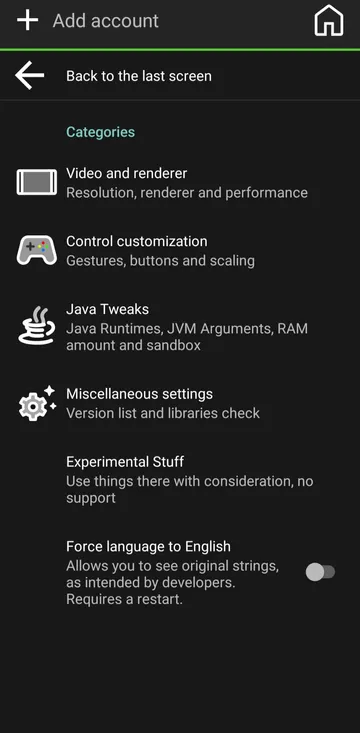
Playing a PC game on a touchscreen can feel difficult at first. Therefore, the launcher provides fully customizable on-screen controls. You can resize every button according to your preference. Furthermore, you can change the opacity of the buttons. This prevents the controls from blocking your view of the game world. You can also map specific keyboard keys to touch elements. For example, you can create a dedicated button for inventory or sneaking.
Performance tuning is another critical aspect of this tool. Java games require significant processor power. Consequently, you should adjust the video settings inside the game menu. Lowering the render distance will increase your frame rate significantly. Additionally, you can allocate more RAM within the launcher settings. You must find the right balance for your specific hardware. If you allocate too much memory, your device might crash. Therefore, increase the memory allocation gradually.
Why Mobile Gamers Choose PojavLauncher for Minecraft
Many players choose PojavLauncher because it offers the complete PC experience. The standard mobile edition of the game lacks certain mechanics. For instance, combat mechanics differ significantly between versions. Redstone behavior also functions differently on the Java Edition. Therefore, hardcore players prefer the precision of the original computer version. This launcher satisfies that need perfectly.
Another major factor is server access. With PojavLauncher, you can join massive Java multiplayer servers. You can play your favorite mini-games on the go. Furthermore, you can interact with your friends who play on computers. This connects different communities seamlessly. You do not need to buy a separate edition to play together. Instead, you use your existing account to connect instantly.
Essential Tips for a Smooth Gaming Experience
To get the best results, you must optimize your device settings. First, close all background applications before playing. This frees up maximum system memory for the game. Second, turn off battery-saving modes on your phone. These modes often reduce processor speed to save power. Therefore, turning them off ensures maximum gaming performance.
Consider using these optimization tips:
- Install performance mods like OptiFine or Sodium.
- Reduce the simulation distance in the game options.
- Use a physical gamepad or keyboard via Bluetooth.
- Keep your mobile operating system updated regularly.
Using external hardware can transform your gameplay completely. A mouse and keyboard setup provides exact control. Consequently, you can play competitively just like on a computer. Lastly, monitor your device temperature during long sessions. Take breaks if your phone gets too warm.
Conclusion
PojavLauncher provides an incredible solution for Minecraft enthusiasts. It bridges the gap between desktop gaming and mobile convenience perfectly. By following the correct setup steps, you can enjoy stable gameplay. You can access deep modding capabilities and massive multiplayer worlds on your phone. However, you must manage your device resources carefully to avoid performance issues. Adjusting your settings will ensure a smooth experience. Ultimately, this launcher changes how players interact with their favorite sandbox game. Download it today to unlock the full potential of Java gaming on the move.
- Google TV Home
- XOS Launcher
- NetCut
- POCO Launcher
-
Samsung Wallpaper services
 Download
Samsung Wallpaper services
Samsung Wallpaper services provides automated background updates...
- Digital Wellbeing
- Android AICore
- Xiaomi Scanner